|
Description:
|
|
: Transcript, yay!
I chatted with Shae Erisson about Emacs, keyboards, Org Mode, and life.
View it via the Internet Archive, watch/comment on YouTube, read the transcript online, download the video / MP3 / transcript, or e-mail me your thoughts!
Chapters
- 0:07 Intro
- 1:01 1999, IRC, community building in Haskell
- 2:02 Emacs as a light-weight build-your-own-editor toolkit
- 2:55 LSP, treesitter, Magit, jujutsu, C++, Python, Haskell, rust
- 3:38 how does a new person experience Emacs? Emacs is always fun.
- 4:07 Markov keyboard project, moving to Finland, right-handed Dvorak, split keyboard; Jeff Raskin; I am not a koala
- 6:45 Purpose-specific function keys
- 7:34 Trackballs, scroll
- 8:17 1" trackpad rings
- 8:58 Pair programming: ttyshare, shwim
- 13:20 Recurse Center, "What is that keyboard? What is that editor?!", Emacs bankruptcy and starter kits
- 16:09 hippie-expand
- 17:18 yasnippet
- 19:01 Function keys
- 20:05 Org Mode
- 21:17 Show Org agenda when idle
- 22:03 Programmers want flow. When programming, light turns red
- 24:27 ef-themes and modus-themes, season
- 25:58 htmlize (does this still work on Wayland?)
- 26:40 lsp-ui-imenu, jumping through rust code
- 28:30 laptop with 126GB of RAM
- 29:48 LSP coolness, Haskell, treesitter
- 32:02 Combobulate
- 32:52 What else are you using your 126 gigabytes of RAM for?
- 33:27 TalonVoice
- 34:46 NixOS, following Steve Purcell about 5 years behind
- 35:06 envrc
- 35:54 time-tracking
- 37:05 taxes with Org Mode, remote lookup
- 41:02 finding notes with C-s
- 42:38 Org Mode, managing inbox
- 46:30 Timestamps
- 49:14 Org timers
- 53:56 Org Mode snippets
- 57:16 Compilation finish function: handle success
Transcript
Transcript
0:00 Intro Sacha: Okay, so I'm going to actually remember to hit go live. I've got a 10 second delay, so if we need to panic, we can panic. Okay, so let's see. I think we are live. Hi, everyone. This is Emacs Chat number 22 after a long hiatus. And today, I'm here with Shae Erisson, who is also like an Emacs friend from a long time back. So this is it. As you were just saying, this is the first time we're actually talking live. And I'm looking forward to hearing about your configuration, how you use Emacs, Shae. But before we dive into that, can you give us a little bit of context? Who you are, what sorts of things you do, and how you use Emacs for that? 0:57 1999, IRC, community building in Haskell Shae: I would say that... I guess I started using Emacs in 1999 when I moved to Finland. And I remember about the same time I was on IRC and I was really frustrated. I remember I got on the Perl IRC channel and I was like, hey, I want an editor that has syntax highlighting. I want to see colors to these words when I'm typing them. And they were like, noob, and they kick-banned me. And I was like, well, maybe I don't want to learn Perl, which I never did. And I guess that was an early introduction into I wanted to be part of communities where people were sharing positive things and building up each other. Actually, I ended up starting the Haskell IRC channel a couple of years later, and that became a very big thing. I would say that I'm mostly known for my work in community building in the Haskell programming language community, because I did that for, I don't know, 15 or 20 years. But I really like Emacs. 1:58 Emacs as a light-weight build-your-own-editor toolkit Shae: So like last week at the same time I had the standing chat with a friend of mine who is also a programmer and he said oh so you're going to do this thing in a week do you want to give me like a preview of the talk and I was like yeah I guess so and some of the things that were really interesting was he was like I've never really tried Emacs I don't know much about it I kind of have this impression that it is a very lightweight build your own editor toolkit and I I was kind of taken aback because, you know, I guess I still have this long ago and far away. I don't know if you remember 8 Megs and Constantly Swapping is what people used to call Emacs and things like that. And I was, it was just kind of, I realized I'm still in my little echo chamber. And this is why I like to talk to other people all the time is because I want to have some exposure to what other people are doing. 2:51 LSP, treesitter, Magit, jujutsu, C++, Python, Haskell, rust Shae: I guess things about Emacs that really changed stuff for me is language server protocol, TreeSitter. Those, I think, are two very powerful tools that are much more generic than, I mean, Magit, of course, is like magic. Although I've mostly switched to jujitsu lately instead for the last year. Let's see, I had, I guess, let's see, I did C++, I did Python, I did a whole lot of Python. And then I had Haskell jobs for five or six years. And then I switched to Rust about a year and a half ago. I now have a Rust job. And one of the things that Prot had asked, I think, or you had asked, and I forget exactly how this went. 3:35 how does a new person experience Emacs? Emacs is always fun. Shae: It was great fun watching your livestream. And it was, how does a new person kind of get comfortable with using Emacs for a particular purpose. And I look for things, in fact, like how do I use Emacs for Rust, Rust development? And I found a couple of good guides on, and I was able to follow most of them, although my Yesnitit stuff is broken and I don't exactly know why tab doesn't work, right? But, you know, like there's always, Emacs is always fun, right? There's so many cool things you could do with it. 4:03 Markov keyboard project, moving to Finland, right-handed Dvorak, split keyboard; Jeff Raskin; I am not a koala Shae: I noticed, I actually hadn't seen your preview page and I noticed that you found my Markov keyboard. Sacha: When you say Emacs is fun, I'm reminded of all of your fun, crazy keyboard experiments. It's like, what? I have a feeling you like to tinker with things. Shae: Yeah, so I think actually the influences as to how I got to where I am are pretty interesting. So the person that I ended up moving to Finland to for dating her, we started a company, we did projects, and I was the programmer. We had this pretty big project. I guess it was like 350,000 euros. And I mean, that was going to be over four years and we had to kind of complete the whole thing, and I was the programmer and we'd had the lowest bid... I had an IBM model M, you know, the super clicky with like all the... And about three years into it, my arm started really hurting a lot. But I was the only programmer. And nobody else knew all the code. And we had to ship it, because that's how we got paid. And so I ended up pushing through. And at the end of it, my arm just didn't work anymore. So for about a year and three months, what I did was I actually taught myself to type right hand. ...Dvorak, because I was already using two-hand Dvorak, and so I kept programming, but I just... One of the things was... like, I like programming, I like using computers, I don't want to wear out my arms again, I don't want to blow them out, so I ended up switching to split keyboards, and I will show you. This is very much the kind of thing that I like to use, and that is like this. 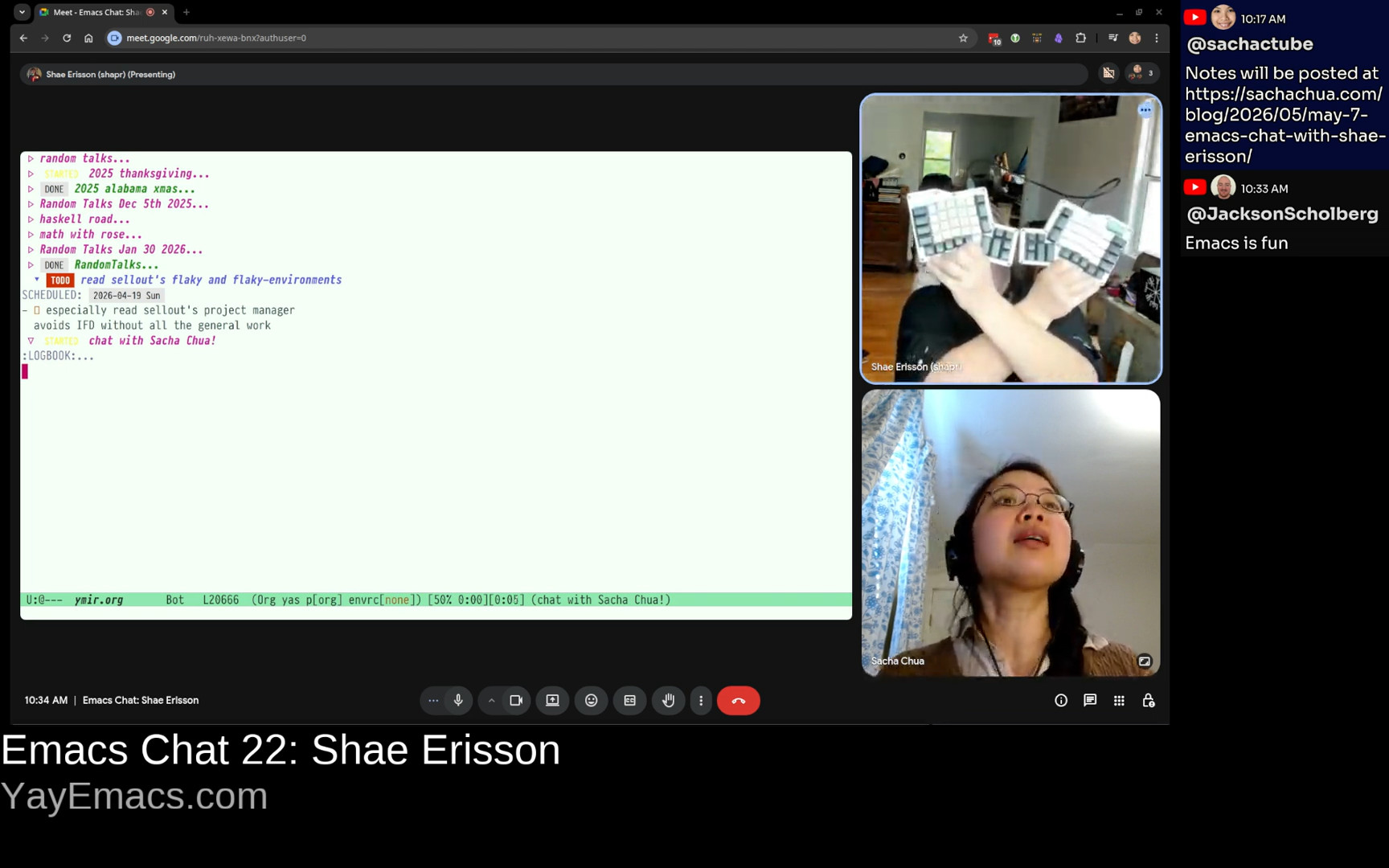 Shae: This is an Ergodox Infinity, but there's a lot of other keyboard flavors like this. And one of the things that I particularly like about this... So around the same time I met Jeff Raskin, who wrote the Inhumane Interface. And so for this particular thing, this is like Control and Alt and Hyper and Super and Shift. And this means that under one thumb, I have a lot more modifier keys than you get off of a standard. And it also means... A lot of my problems started with Emacs pinky, the dreaded, the infamous... I think that one of my... I made a keyboard layout called "I am not koala." You may not know this, but koalas have two thumbs. They have one on each side. And that's cool, but I don't have two thumbs, and I realized that when I was trying to grab something, I didn't put my pinky on it. That would be silly, right? I want to put my thumb around it. And so I decided I would move all of my chording keys under my thumbs. And that's kind of how I... Shae: This is an Ergodox Infinity, but there's a lot of other keyboard flavors like this. And one of the things that I particularly like about this... So around the same time I met Jeff Raskin, who wrote the Inhumane Interface. And so for this particular thing, this is like Control and Alt and Hyper and Super and Shift. And this means that under one thumb, I have a lot more modifier keys than you get off of a standard. And it also means... A lot of my problems started with Emacs pinky, the dreaded, the infamous... I think that one of my... I made a keyboard layout called "I am not koala." You may not know this, but koalas have two thumbs. They have one on each side. And that's cool, but I don't have two thumbs, and I realized that when I was trying to grab something, I didn't put my pinky on it. That would be silly, right? I want to put my thumb around it. And so I decided I would move all of my chording keys under my thumbs. And that's kind of how I... 6:43 Purpose-specific function keys Shae: And another thing I did was when I was really only able to use one hand, was I made my function keys mostly purpose-specific. And that was from Jeff Raskin's writings in The Humane Interface. So I guess I'm a programmer who really likes writing code, doesn't want to wear out my arms, and likes to do fun keyboard things, yeah. Sacha: Definitely. You're in it for the long term. You don't want to use up all of your arm capacity now and not be able to keep programming in the future. And now there's hardware to make that easier. So I'm glad. Split keyboards with extra thumb keys seem to be very popular in the Emacs community. I'm now tempted to find space in my desk in order to make that happen. 7:30 Trackballs, scroll
 Shae: Another thing I ended up switching to was I started using trackballs. Oh yeah, yeah. I tend to go completely overboard when trying out new things, so I bought 20 different models of trackballs and ended up settling on this one. The nice thing about this one is that this is how you scroll, and it has four buttons. Sacha: That is really cool. I like using ThinkPads, so I've been just living off the tiny little mouse in the middle of the keyboard. But back in the day, I also used a trackball. If I can get to the point where I want to take my hands off the keyboard again in order to do mouse things, that would probably be the direction I would go. Shae: Another thing I ended up switching to was I started using trackballs. Oh yeah, yeah. I tend to go completely overboard when trying out new things, so I bought 20 different models of trackballs and ended up settling on this one. The nice thing about this one is that this is how you scroll, and it has four buttons. Sacha: That is really cool. I like using ThinkPads, so I've been just living off the tiny little mouse in the middle of the keyboard. But back in the day, I also used a trackball. If I can get to the point where I want to take my hands off the keyboard again in order to do mouse things, that would probably be the direction I would go. 8:14 1" trackpad rings Shae: I had an experiment in that area, which is where I purchased a one-inch touchpad, and I strapped it to my finger. And it was a PS2, and it had a USB converter plugged into it. And the idea was I could keep typing, and then I could move the mouse around without taking my hands off the keyboard. And now they actually have touchpad rings. They came out six months or a year ago. It's relatively recent. But the idea is no change in context. Sacha: I've only seen the scroll rings, but now there's a touchpad version. That is interesting. Shae: Yeah, I think that's pretty cool stuff. Hardware is actually improving things. 8:54 Pair programming: ttyshare, shwim Shae: Oh, another thing, one of the things you talked about with Prot was how do you learn other people's stuff? And one of the things that I use for pairing, so I have one coworker, and it's a strange, interesting job. I like it a lot. And I met this coworker at a previous job, and one of the things, let's see if I can find it. So we used to, at the previous job, we used this thing called ttyshare. Have you heard of it? ttyshare. It's great. You can run it in a terminal and then you can effectively share your terminal with someone else. And so you have multiplayer terminals and that's neat. It was kind of a pain to set up. You had to make sure that you weren't NATed, you know, like you had to have effectively... someone had to have a public IP. You had to do a couple of other things. And as part of my job, I'm now, I guess, part maintainer for Magic Wormhole, the software. 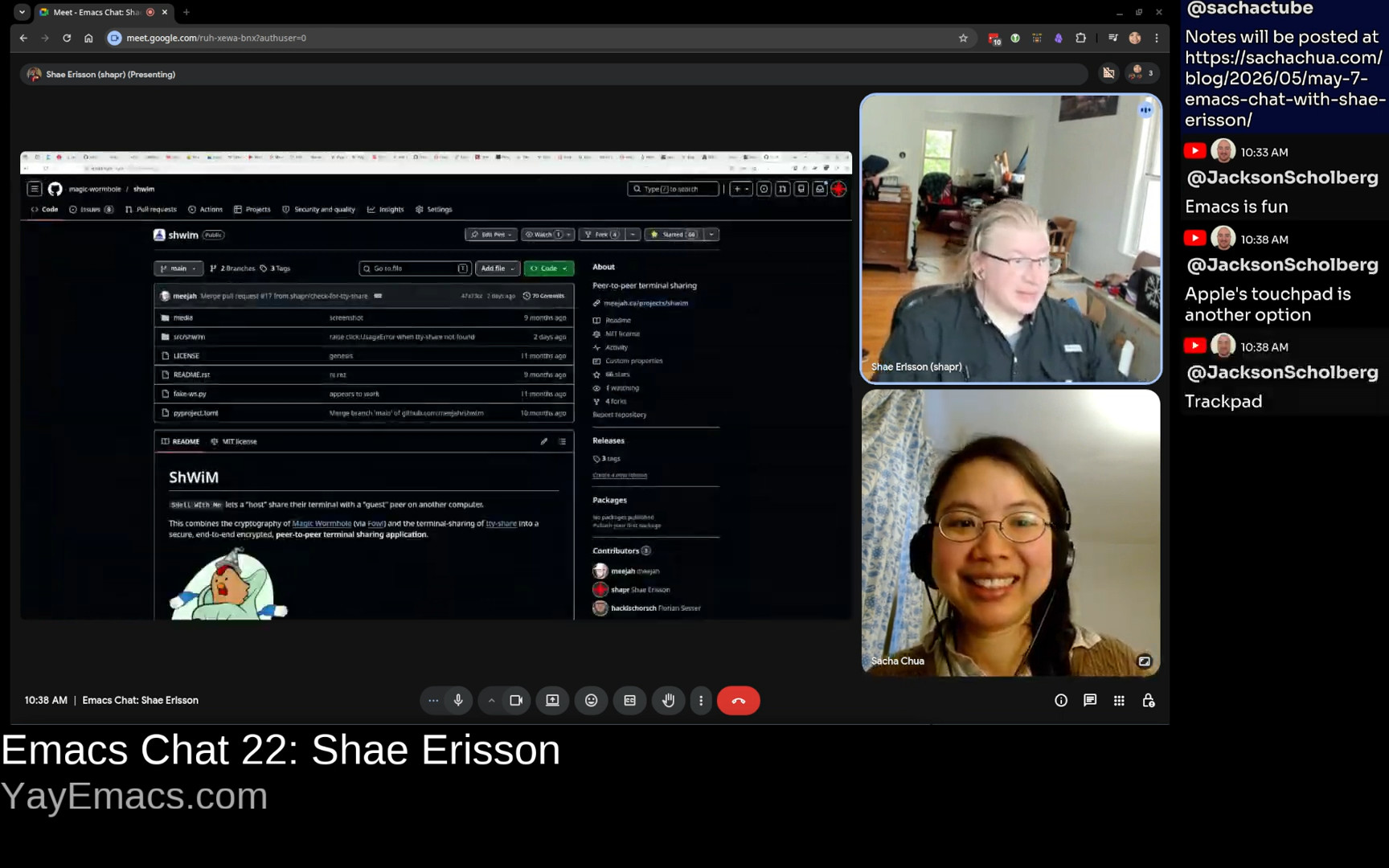 Shae: And so one of the things that my coworker wrote was this nifty thing called ShWiM. And it's basically "shell with me." And it's a wrapper around TTY share so that with one single command, you can share a terminal. And the way that we use this is... We both run Emacs as a server, and then we use emacsclient in the terminal to connect. Shae: And so one of the things that my coworker wrote was this nifty thing called ShWiM. And it's basically "shell with me." And it's a wrapper around TTY share so that with one single command, you can share a terminal. And the way that we use this is... We both run Emacs as a server, and then we use emacsclient in the terminal to connect. 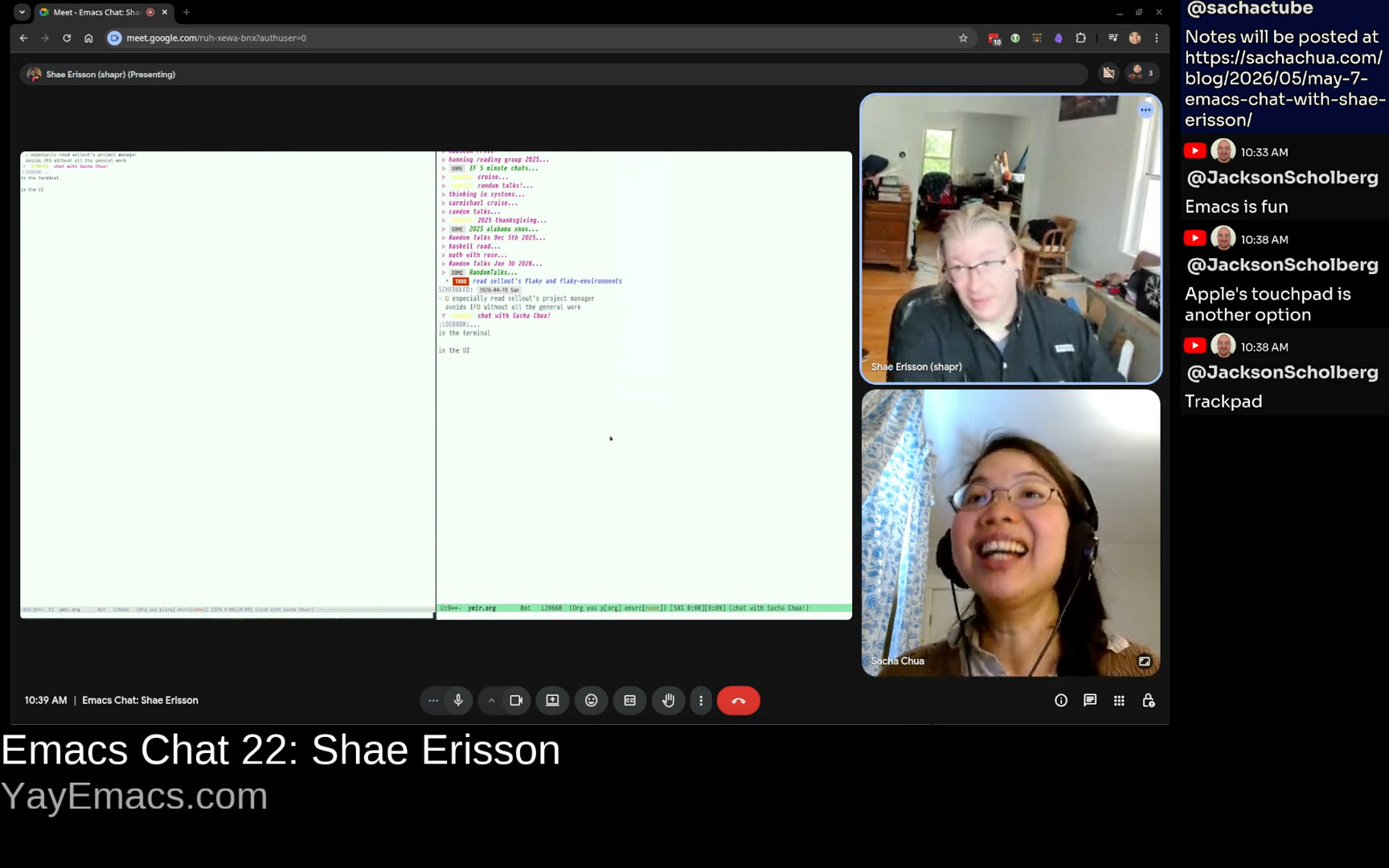 Shae: I don't know if you've ever done this, but I can have a terminal right next to this, and if I run emacsclient in a window, then I'm sharing the same thing. This is a graphical chat with Sacha, in the terminal or in the UI, and both of them are updated. Sacha: That's fantastic. I remember people were using tmate for something similar before where you could share that. But yeah, it's just making it seamless, making it frictionless. And on the other side, I have also just been using wormhole to send large files back and forth between Karthik and John Wiegley because we have this other Emacs chat thing where we're going to post it eventually, once I finish figuring out how to redact all the personal information and Org files. But yeah, it's great for being able to send things without having to worry about, oh, you know, what's my public IP? Can I tunnel all the different things to get past whatever firewalls there are? So if this also works for terminal things plus Emacs client, that sounds really, really exciting. Shae: We've tried some other experiments. One of the things we tried to do was, and the only downside is like, what if my terminal has a different size, then you have to kind of shrink and match. And so we tried to honestly directly bridge to Emacs clients. And because I don't know if you're aware that there's effectively a local socket for the Emacs client that you can have multiple things connect to. But it turns out there's some sort of like system so I couldn't like reach across the network and directly use my co-workers Emacs session and he couldn't use mine. Weird things happened when we tried to do this cross host. As far as I can tell the Emacs client only works in the same host. Sacha: That's interesting. Lately, I've also been experimenting with CRDT, which has that Emacs-less plant as well. So that's been nice. But yeah, of course, a lot of people will be kind of stuck with the first challenge of finding someone that they can pair in Emacs with. Shae: I understand. And I think I'm honestly very happy that my one single coworker at this job is also a big Emacs user. And so we exchanged cool ideas and worked on stuff. And I'm very happy about that. Sacha: Were they already an Emacs person before they joined? Or did you pick the coworker because they were an Emacs person? Shae: They picked me. They were pretty much the person who started this thing. And they picked me because they'd worked with me at the previous job. Although I did have an experience like that. I had this massive Emacs config file, like 20,000 lines, and half of it was comments because it had accrued over 20 years. Shae: I don't know if you've ever done this, but I can have a terminal right next to this, and if I run emacsclient in a window, then I'm sharing the same thing. This is a graphical chat with Sacha, in the terminal or in the UI, and both of them are updated. Sacha: That's fantastic. I remember people were using tmate for something similar before where you could share that. But yeah, it's just making it seamless, making it frictionless. And on the other side, I have also just been using wormhole to send large files back and forth between Karthik and John Wiegley because we have this other Emacs chat thing where we're going to post it eventually, once I finish figuring out how to redact all the personal information and Org files. But yeah, it's great for being able to send things without having to worry about, oh, you know, what's my public IP? Can I tunnel all the different things to get past whatever firewalls there are? So if this also works for terminal things plus Emacs client, that sounds really, really exciting. Shae: We've tried some other experiments. One of the things we tried to do was, and the only downside is like, what if my terminal has a different size, then you have to kind of shrink and match. And so we tried to honestly directly bridge to Emacs clients. And because I don't know if you're aware that there's effectively a local socket for the Emacs client that you can have multiple things connect to. But it turns out there's some sort of like system so I couldn't like reach across the network and directly use my co-workers Emacs session and he couldn't use mine. Weird things happened when we tried to do this cross host. As far as I can tell the Emacs client only works in the same host. Sacha: That's interesting. Lately, I've also been experimenting with CRDT, which has that Emacs-less plant as well. So that's been nice. But yeah, of course, a lot of people will be kind of stuck with the first challenge of finding someone that they can pair in Emacs with. Shae: I understand. And I think I'm honestly very happy that my one single coworker at this job is also a big Emacs user. And so we exchanged cool ideas and worked on stuff. And I'm very happy about that. Sacha: Were they already an Emacs person before they joined? Or did you pick the coworker because they were an Emacs person? Shae: They picked me. They were pretty much the person who started this thing. And they picked me because they'd worked with me at the previous job. Although I did have an experience like that. I had this massive Emacs config file, like 20,000 lines, and half of it was comments because it had accrued over 20 years. 13:13 Recurse Center, "What is that keyboard? What is that editor?!", Emacs bankruptcy and starter kits Shae: And in 2019, when I first went to the Recurse Center, well, my first batch, I just was extremely extroverted and social. But my second immediate following batch, which is not the common pattern, I was like, okay, my goal is to write a bunch of Haskell, get some Haskell jobs, And so I went to the quiet room on the quiet floor. But then someone else came in, Marianne, my favorite programming friend. And she was like, what is that keyboard you're using? And I was like, ah, this is an Ergodox thing. And then she's like, what is this editor you're using? And I was like, oh, that's Emacs. And I was kind of a grumpy, like, I'm trying to get stuff done. But she was persistent. She was like, show me this thing. And so I was like, I'll show you Emacs. And she was like, this is great. And I was like. This thing? OK, cool. And I was like, I don't think you want my config. You'll probably want a starter kit. And she was like, well, what are starter kits? And I was like, well, I've heard about Spacemacs. I've heard about Doom. And I would try one of those. So she tried Spacemacs. And I guess this next part happened over several months. She tried Spacemacs. And then she was like, I like it, but it's slow. So I'm switching to Doom Emacs. And I would pair with her. And I was like, wow, look at all these cool things that the starter kits can do. I ended up flushing my entire 20-year-old config and kind of starting over and stealing a lot of great ideas from the starter kits. And Marianne is very ambitious, independent, hardworking, very focused. I'm not very focused. But I've learned a lot of things from her and watching her kind of... I haven't done C in Emacs in a long time so it's great fun to watch her learn these new things and then I learned stuff too and yeah it's good to have collaborative people to work with. Sacha: So it sounds like if people would like to encourage more people to talk to them about Emacs, feel free to use your strange keyboards out in public. Shae: I like that. That's good. That is good. Yeah I think that's reasonable. Sacha: Yeah, and I've just recently started digging into the starter kits too, because I realized I don't know much about them. It is really interesting going through them and discovering all these Emacs 31 options that you can enable to simplify your config or improve your workflow and all that stuff. So there's a lot of good stuff in starter kits, even for people who are not newcomers. Shae: I agree. And I think there's nothing wrong with just learning a bunch of new things, trying them out, and also throwing them away if you don't like them. Sacha: Now that you've declared Emacs bankruptcy and rebuilt your Emacs on top of other people's starter kits, what has made it into your config? What have you kept from those 20 years of tinkering with Emacs that you really wanted to stick around? 16:06 hippie-expand Shae: I think the only thing that has absolutely stuck around is my use of hippie-expand, which is, I believe, a very old... an ancient tool from a different time. Most of the other stuff is kind of gone. Gone to the wayside. But I really like, I honestly really like hippie-expand. And I know that like, I have rarely heard of other people who use hippie-expand. But you use it? I think you just muted yourself. Sacha: I also vote for hippie-expand. It's a nice way to try different functions and just say, I just want all these different possible completions to go in there. Shae: Yeah. The thing for me that really sold me on hippie-expand is that most of the time when I am... When I'm doing something, I want to say, like, I can already see that word, just pick that one. And so I'll type the first characters and hit, like, meta forward slash, and ta-da, it's usually there. But then sometimes I do really want, like, some Elisp or some other stuff. And so I actually spent a lot of time tuning this the first time. 17:14 yasnippet Shae: I actually only changed it for the first time recently because I was reading a how to write Rust well inside Emacs and they said oh well you want to use yasnippet and so I you know the funny thing is that yasnippet I believe is the thing that got me into Emacs like in 1999 I met this Finnish person Erno Kuusela in Oulu, Finland. Really cool guy. I was like, wow, how do you do this? As soon as you open a file, it's got a substructure and a skeleton. And when you type part of a function or something, it just populates it. And he was like, I'm using this snippet command in Emacs. That's why I was like, what's Emacs? It was very exciting. And at the time, I was using Vim. And Vim was not as, I don't want to say, automatable. Sacha: Yeah, now with Neovim and Lua, people are writing more extensions for it. But before, you had to know a lot of magic in order to customize Vim. Shae: Right, right. I agree. Let's see, what else do I do? I run my own email server, and I, of course, read my email in Emacs. In GNU, no less. Which is, I know, an NNTP reader, but it's still also a great... I used to use twiddle compile and I think that stopped working like six years ago, so I need to get rid of this comment, but there's still a lot of kind of cruft from earlier times. 18:52 Function keys Shae: Remember how I said that I use function keys to have like purpose specific stuff? This was especially true because, I mean, I had my left arm strapped to my chest for like a year and three months before I even started regaining any flexibility, and that meant that... I'm amazed that you could just map them directly to single commands instead of giving in to the temptation to make them prefixes for longer keystrokes. I didn't really have the choice because I had only one arm that worked. It was just a lot harder to do any chording at the time. I still have a lot of these. F3 I use a lot, which is like, oh, what am I working on right now? That is org-clock-goto. A lot of times, I want to have a terminal that's in Emacs, so that's vterm, 20:02 Org Mode
 Shae: And I actually really do use the calendar all the time. This is like just switch to whatever it is. Of course, my email is here. You know what, let's see... So this... I don't know, have you seen this before? Have you seen this thing called STARTED in an Org mode file? Sacha: I use a STARTED state, yes. Shae: Well, I got it from you! So if I look at like, my Org Mode configuration, a lot of this STARTED stuff I have from you, I don't know when, but you were the person who introduced me to it. Sacha: It's the reminder that I did start working on this. I tend to get distracted by intermediate tasks, so it's nice to be able to say, try to finish these ones first before you move on to the next thing, maybe? Shae: I agree. I have the same thing, yeah. And I keep meaning, because this is... I know that you can put Org Mode configuration into the first TODO item. I would really like to move it into the elisp and I just haven't gotten around to it. And it's been 10 years. I mean, maybe I should just do it. Shae: And I actually really do use the calendar all the time. This is like just switch to whatever it is. Of course, my email is here. You know what, let's see... So this... I don't know, have you seen this before? Have you seen this thing called STARTED in an Org mode file? Sacha: I use a STARTED state, yes. Shae: Well, I got it from you! So if I look at like, my Org Mode configuration, a lot of this STARTED stuff I have from you, I don't know when, but you were the person who introduced me to it. Sacha: It's the reminder that I did start working on this. I tend to get distracted by intermediate tasks, so it's nice to be able to say, try to finish these ones first before you move on to the next thing, maybe? Shae: I agree. I have the same thing, yeah. And I keep meaning, because this is... I know that you can put Org Mode configuration into the first TODO item. I would really like to move it into the elisp and I just haven't gotten around to it. And it's been 10 years. I mean, maybe I should just do it. 21:14 Show Org agenda when idle
 Shae: One of the things I did that I found fun... I really have written almost zero Elisp, but I did actually puzzle my way through this a year ago. Since so much of my life is in Org Mode, I learned how to make timers. This is very close to what you get directly out of how to do timers in Emacs. After some amount of time, I want my Org agenda to pop up because I want to say like, oh, what is the stuff I'm supposed to be doing? And what am I forgetting? What has been scheduled? And what is on my to-do list? And I also like to look at what is the stuff I've been working on lately? And I really like that a lot. Shae: One of the things I did that I found fun... I really have written almost zero Elisp, but I did actually puzzle my way through this a year ago. Since so much of my life is in Org Mode, I learned how to make timers. This is very close to what you get directly out of how to do timers in Emacs. After some amount of time, I want my Org agenda to pop up because I want to say like, oh, what is the stuff I'm supposed to be doing? And what am I forgetting? What has been scheduled? And what is on my to-do list? And I also like to look at what is the stuff I've been working on lately? And I really like that a lot. 21:58 Programmers want flow. When programming, light turns red
 Shae: Another thing that I realized is that I had a blog post that was wildly popular. Where did I put it? And it was all about Emacs. I don't know if you saw the... Here we go. It was... Ah, here it is. So here it is in... This is very much an Emacs... Sacha: Oh, yeah, I remember that one. I put it in Emacs News. I thought it was great. Shae: All right, cool. Sacha: I would like the kiddo to sometimes be able to acknowledge this, but this is not happening. Still, yes. Shae: Right, right. Yeah, and so this was really fun because, like... I had a friend who was in development and there was like millions of dollars spent on how do you detect whether a programmer is in flow and it came down to if they're typing they're probably in flow so and Shae: Another thing that I realized is that I had a blog post that was wildly popular. Where did I put it? And it was all about Emacs. I don't know if you saw the... Here we go. It was... Ah, here it is. So here it is in... This is very much an Emacs... Sacha: Oh, yeah, I remember that one. I put it in Emacs News. I thought it was great. Shae: All right, cool. Sacha: I would like the kiddo to sometimes be able to acknowledge this, but this is not happening. Still, yes. Shae: Right, right. Yeah, and so this was really fun because, like... I had a friend who was in development and there was like millions of dollars spent on how do you detect whether a programmer is in flow and it came down to if they're typing they're probably in flow so and |



.png)
 More
More
 Religion & Spirituality
 Education
 Arts and Design
 Health
 Fashion & Beauty
 Government & Organizations
 Kids & family
 Music
Music News & Politics
 Science & Medicine
 Society & Culture
 Sports & Recreation
 TV & Film
 Technology
 Philosophy
 Storytelling
 Horror and Paranomal
 True Crime
 Leisure
 Travel
 Fiction
 Crypto
 Marketing
 History
 Comedy
 Arts
Arts Games & Hobbies
 Business
 Motivation